
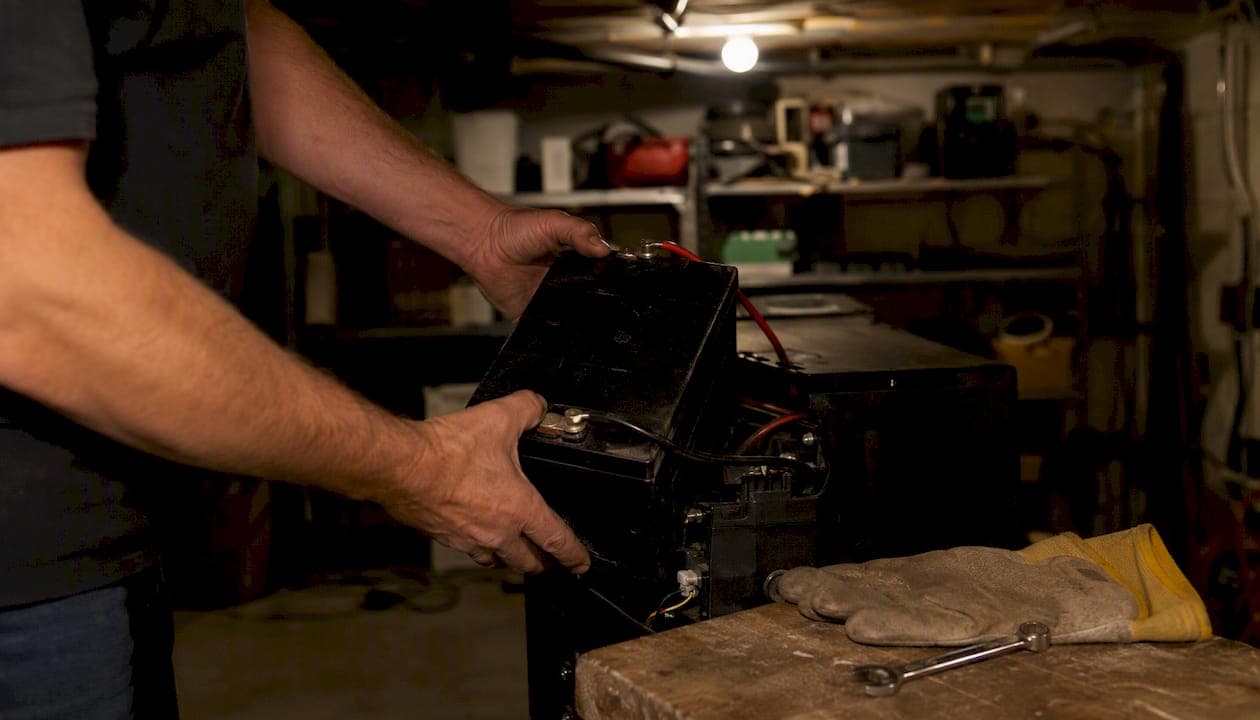
Replacing a UPS battery is a job most people can safely handle in 15 to 30 minutes, provided you match the correct model and part number and follow a few non-negotiable safety steps first. Before you touch anything, do this: power down or transfer your connected equipment to another outlet, find the model sticker on the back or inside the battery door, and confirm the exact replacement part number before you order anything.
Here's the fast path to a safe swap:
- Locate the model and battery part number on the rear label or battery compartment door.
- Power down or transfer your load to another circuit so nothing loses power mid-swap.
- Order the exact replacement — matching voltage, amp-hour rating, and terminal type, not just a "compatible" guess.
- Schedule the physical swap for a time when the connected equipment can tolerate a brief runtime gap.
Pro Tip: Before you order anything, verify both the battery chemistry and the part number. A pack that's electrically similar but chemically different (say, AGM instead of the vented lead-acid your unit expects) can undercharge, overheat, or void your warranty.
Key Takeaways
Matching the exact model, voltage, and terminal type before ordering is the single factor that determines whether a UPS battery replacement goes smoothly or turns into a return shipment.
| Point | Details |
|---|---|
| Verify before you buy | Match model, part number, voltage, Ah rating, and terminal type before ordering a replacement. |
| Test runtime first | A 30% or greater drop from rated runtime signals it's time to replace the battery. |
| Follow safety steps every time | Disconnect the charger, remove jewelry, and use insulated tools even on batteries that seem dead. |
| Control temperature | Keep batteries between roughly 10°C and 25°C to avoid losing years of useful life. |
| Buy from a verified source | Akkuplus lists exact voltage, Ah, and terminal specs on every battery page to prevent mismatched orders. |
Table of Contents
- How to Find the Correct UPS Battery Replacement
- What Are the Warning Signs a UPS Battery Needs Replacing?
- Can You Replace a UPS Battery Yourself, Step by Step?
- Which Battery Chemistry Does Your UPS Actually Use?
- How Much Does UPS Battery Replacement Cost?
- What Should You Check Before Buying a Replacement Battery?
- How Do You Maintain a UPS Battery to Extend Its Life?
- Where to Buy a Verified Replacement Battery and Get Help Installing It
- Sources
How to Find the Correct UPS Battery Replacement
On desktop and tower units from APC, CyberPower, or Tripp Lite, check the rear panel first. On rack-mount and larger MGE/Eaton systems, the battery part number is often printed on the battery cartridge itself or on a sticker just inside the access door.
You're hunting for a handful of specific numbers, and all of them have to match:
- Nominal voltage (commonly 6V or 12V per cell, sometimes higher for multi-cell packs).
- Amp-hour (Ah) rating, which determines how much charge the battery holds.
- Terminal style — faston tabs, threaded bolts, or a specific connector shape.
- Physical dimensions and orientation so the pack actually fits the compartment.
If you're shopping on a retailer's site, look for labels like "RBC" (Replacement Battery Cartridge), "RBCx" with a number, or straightforward listings of pack voltage and Ah. A 12-volt, 24Ah lead-acid pack is a good example of how these specs get listed on a product page: voltage, capacity, and chemistry all stated up front so you can cross-check against your old unit before buying.
Pro Tip: Photograph the sticker and the old battery before you remove anything. Note the serial number and manufacturing date code. If a replacement ever needs a warranty claim, that photo is your proof of what was actually installed and when.
What Are the Warning Signs a UPS Battery Needs Replacing?
The clearest signal is a runtime drop. If your UPS used to hold your servers up for 20 minutes and now it's down to 12 or 13, that's a 30% or greater decline from the original specification, and it's treated as a practical threshold for replacement in manufacturer documentation. Other signs are harder to ignore once you spot them:
- Frequent "replace battery" alarms that clear briefly, then return.
- Physical swelling or bulging of the battery case.
- Leakage, white crust, or corrosion around the terminals.
- A UPS that beeps constantly on battery power even with a light load.
- Failure to complete the unit's built-in self-test.
Testing runtime yourself is straightforward: unplug the UPS input (with equipment connected and running) and time how long it stays up under a known load, then compare that to the manufacturer's rated runtime for that load level. If you're seeing that 30% shortfall or worse, plan on replacement. For a more definitive answer, a multimeter check on the battery terminals while under load reveals whether voltage is sagging faster than it should. If voltage drops sharply the moment you disconnect AC power, the battery likely can't hold a meaningful charge anymore, and a full capacity or discharge test at that point is mostly confirming what you already suspect.
Can You Replace a UPS Battery Yourself, Step by Step?
Yes, for the vast majority of consumer and small rack-mount units, this is a task you can do without an electrician. Most manufacturers, including APC, CyberPower, and Tripp Lite, design their battery compartments specifically for user access, with tool-free or single-screw doors. Where DIY makes sense: user-replaceable cartridges, non-life-safety applications, and units where the battery isn't wired into a larger external cabinet.
Here's the sequence that keeps you safe and gets it right the first time:
- Pre-check the replacement battery against the model/part number before opening anything.
- Transfer your load to another power source, or shut down connected equipment gracefully.
- Disconnect the UPS from AC input entirely, not just the connected devices.
- Open the battery compartment and photograph the wiring before touching connectors.
- Remove connectors one at a time, labeling each if there's more than one lead.
- Slide out the old battery pack and set it aside on a non-conductive surface.
- Install the new pack, matching polarity and connector orientation exactly.
- Reconnect leads, close the compartment, then restore AC input.
- Run the unit's self-test to confirm the new battery reports correctly.
- Return connected equipment to the UPS output once the self-test passes.
Safety isn't optional here, and the manufacturer guidance on this is blunt for good reason. APC's own battery service instructions call for disconnecting the charging source first, wearing eye and hand protection, and using insulated tools throughout.
- Remove rings, watches, and any conductive jewelry before you start.
- Use insulated tools exclusively, never bare metal wrenches or screwdrivers.
- Never lay a metal tool or object across the battery terminals.
- Wear eye protection in case of an unexpected arc.
Even a battery you'd call "dead" can still discharge dangerous short-circuit current. That's not a theoretical warning. Even sealed lead-acid batteries retain enough stored energy to cause a severe arc, and a dropped wrench across two terminals can cause real burns.
Pro Tip: Call in a professional when you're dealing with multiple battery strings wired together, an external high-voltage battery cabinet, any sign of physical damage like bulging or leakage, or a UPS protecting genuinely critical infrastructure. The cost of a service call is trivial next to the cost of an arc injury or a fried server room.
Which Battery Chemistry Does Your UPS Actually Use?
Most consumer and small-business UPS units run on VRLA (valve-regulated lead-acid, often called AGM), and for good reason: it's sealed, needs no topping off, and tolerates the on-again, off-again charge cycles a backup battery experiences. VRLA typically lasts 3 to 5 years under normal conditions.
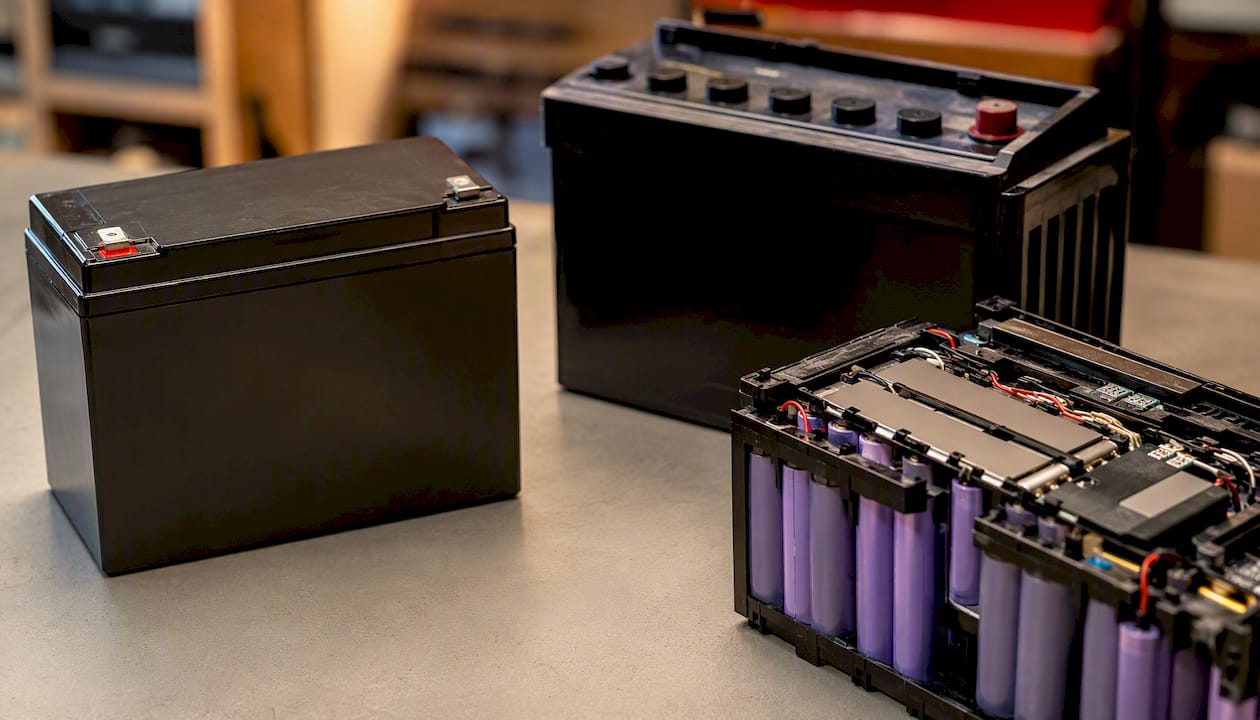
Flooded (vented) lead-acid batteries show up in larger data-center and industrial UPS installations. They need dedicated room ventilation because they off-gas hydrogen during charging, but with proper maintenance they can last up to 20 years, which is why facilities willing to handle that upkeep still choose them for large installations.
Lithium-ion is the newer entrant, mostly in higher-end rack and data-center UPS systems. It weighs less, charges faster, and tolerates a wider temperature range, but it carries different thermal storage and safety requirements than lead-acid chemistries, and it costs considerably more upfront.
One rule matters more than any spec sheet: never mix chemistries, and never mix batteries of different ages within the same string. A charger tuned for VRLA float voltage will undercharge or overcharge a lithium pack, and one weak cell in a string drags down the whole set's performance.
| Chemistry | Typical Life | Ventilation Needs | Cost/Weight |
|---|---|---|---|
| VRLA/AGM | 3–5 years | Minimal, sealed design | Low cost, moderate weight |
| Flooded lead-acid | Up to 20 years with maintenance | Requires room ventilation | Low cost, heavy |
| Lithium-ion | Longer cycle life, wider temp range | Different thermal storage rules | Higher cost, lighter |
Pro Tip: Temperature does more damage to battery life than almost anything else. Operating consistently above the recommended range can cut years off a battery's useful life compared to keeping it between roughly 10°C and 25°C. A UPS tucked into a warm closet ages faster than one in a climate-controlled server room, even with identical batteries.
How Much Does UPS Battery Replacement Cost?
Replacement packs for small desktop UPS units generally run in the range of a modest one-time purchase, while multi-battery external cabinets for larger rack systems cost considerably more since they involve several cells wired in series. Where you land on that range depends on voltage, Ah capacity, and whether you're replacing one internal pack or an entire external string.
Run through this checklist before you decide between a replacement battery and a whole new UPS:
- Age of the UPS itself — electronics beyond the battery degrade too, and a unit past 7 to 10 years may have other failing components.
- Replacement cost versus remaining warranty — if the UPS is still under warranty, a manufacturer-sourced battery may be covered or discounted.
- Load requirements — if your equipment has grown since you bought the unit, a battery swap alone won't fix insufficient capacity.
- Other signs of wear — fan noise, error codes unrelated to the battery, or a cracked case suggest the whole unit is aging out.
As a rough guideline, if the replacement battery costs more than half of what a comparable new UPS would run, or if you're dealing with a battery string older than 5 years inside a unit that's also aging, it's worth pricing out a new unit rather than throwing good money at a failing chassis. This isn't a hard rule, just a sanity check. Proactive replacement based on testing, rather than waiting for a failure, is also one of the more reliable ways to avoid unplanned downtime tied to battery degradation.
What Should You Check Before Buying a Replacement Battery?
A wrong or low-quality battery purchase costs you twice: once in money, once in the downtime while you wait for the correct part. Run through this list on any product page before you click buy:
- Exact model and part number match, not just a "fits most" claim.
- Voltage and Ah rating stated explicitly and matching your old unit.
- Terminal type shown in photos, since faston and bolt-style terminals aren't interchangeable.
- Manufacture date or date code listed, since a battery that's sat on a shelf for two years has already lost capacity.
- Warranty and return policy clearly stated in case the pack arrives faulty.
- OEM versus compatible labeling, so you know whether you're getting a manufacturer part or a third-party equivalent.
Battery shipments sometimes move slower than typical parcels because sealed lead-acid and lithium packs fall under hazardous materials shipping rules, which can restrict carrier options or add handling time. If a listing promises next-day delivery on a heavy battery pack, double-check the shipping class before you count on it.
Pro Tip: Photograph every battery the moment it arrives, including the label with its serial number and date code, before you install it. If a warranty claim ever comes up, that photo is timestamped proof of what you received and when.
How Do You Maintain a UPS Battery to Extend Its Life?
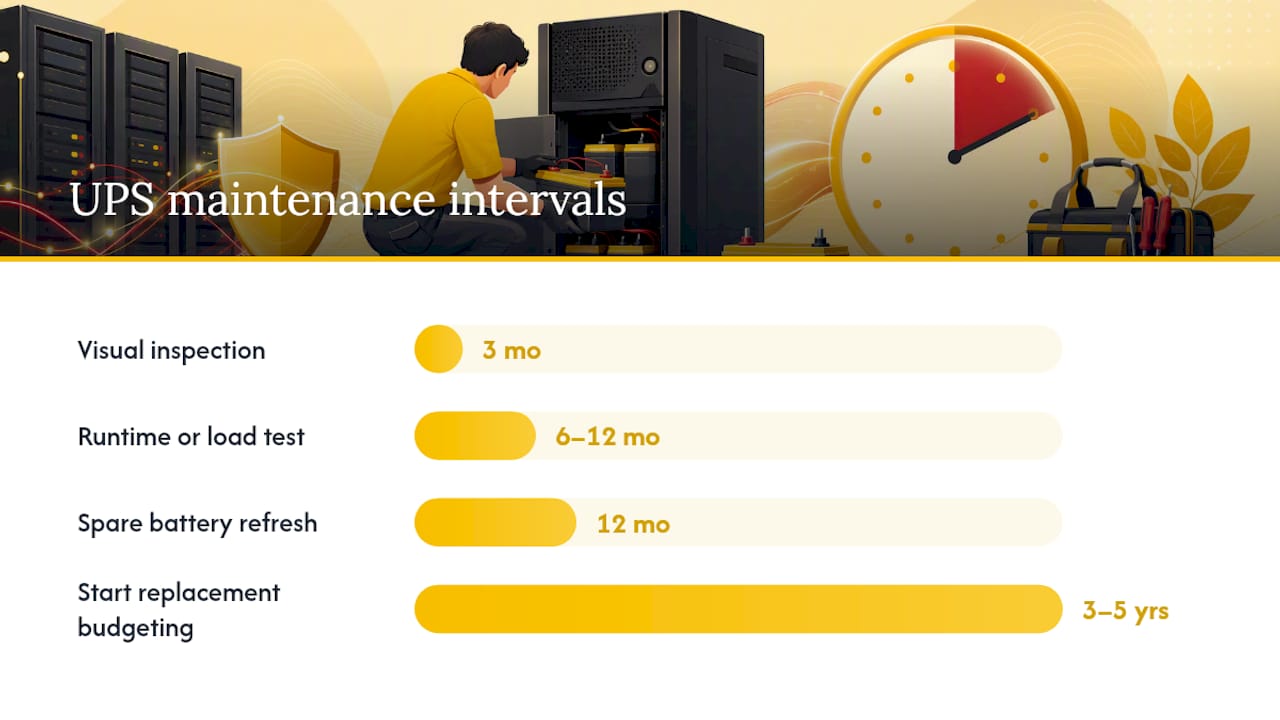
The single biggest maintenance mistake is treating a UPS like a smoke detector: install it, forget it, and hope it works when needed. Scheduled preventive maintenance with visual inspections and load testing every 3 to 6 months catches deterioration long before it becomes a 2 a.m. emergency.
A workable maintenance cadence looks like this:
- Every 3 months: visual inspection for swelling, corrosion, or loose connections.
- Every 6 to 12 months: a full runtime or load test to catch capacity loss early.
- At 3 to 5 years: start budgeting for replacement, sooner in hot environments.
Temperature control matters more here than almost any other factor. Keep the UPS in a space between roughly 10°C and 25°C, and away from direct heat sources like server exhaust or sunlit windows. Spare batteries in storage need periodic freshening charges too. Leaving a spare pack sitting unused for a year without a top-off charge can leave it significantly degraded before it's ever installed.
Keep a simple log of manufacture date codes and test results for every battery you install. That record turns "the UPS died unexpectedly" into "we knew this pack was due in four months," which is the entire point of doing maintenance in the first place.
Publisher perspective: why we push readers toward verified parts and testing
Most of the support requests we see at Akkuplus aren't about complicated electronics. They're about someone who ordered a battery based on voltage alone, ignored the terminal style, and now has a pack that physically doesn't fit or a charger that can't read it correctly. The fix is almost always upstream of the purchase: matching part numbers and chemistry before checkout, not after the box arrives.
We treat verified compatibility and clear warranty terms as the actual product, not an afterthought bolted onto a battery listing. A 12-volt replacement pack is worth little to a customer if the terminal doesn't match their unit, so we push detailed spec photos and date codes on every listing precisely because that's where most replacement mistakes originate.
Where to Buy a Verified Replacement Battery and Get Help Installing It
If you've read this far, you already know the two things that make or break a UPS battery swap: getting the exact right part, and handling it safely once it arrives. That's exactly where Akkuplus fits into the process.

Akkuplus stocks a wide range of sealed lead-acid and specialty batteries with clear voltage, Ah, and terminal specifications listed on every product page, so you're not guessing at compatibility from a vague description. We offer:
- Model and part-number lookup help so you order the correct pack the first time.
- Same-day dispatch on common battery sizes, including 6V and 12V packs in the most frequently replaced capacities.
- Battery testing guidance to confirm whether replacement is actually necessary before you spend money.
- Recycling and disposal handling so your old battery doesn't end up in general trash.
If you already know what your UPS needs, a 12-volt, 2000mAh replacement battery is one of the most commonly ordered sizes for small and mid-size units. For larger external battery cabinets, browse the Akkuplus catalog to match higher Ah ratings and confirm terminal style before you check out.
Sources
- Battery safety and indicators (installation document)
- How temperature impacts UPS battery life and performance