
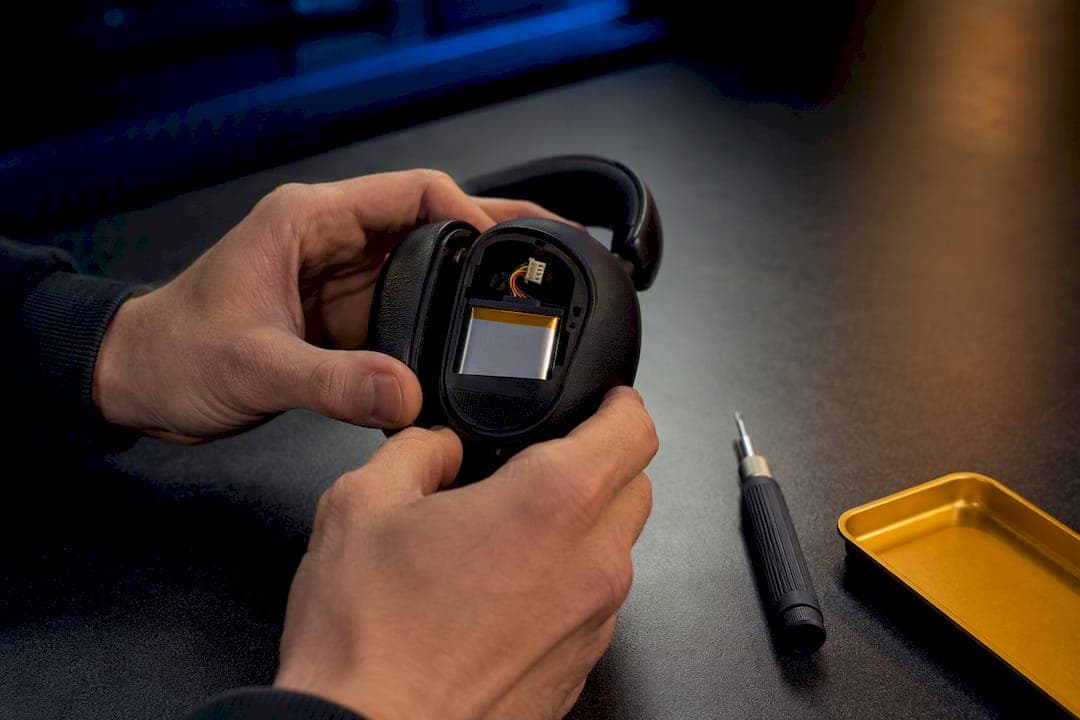
Yes, in most cases you can replace a headset battery, though the difficulty ranges from a 30-second swap to a soldering job better left to a professional. Start by checking the manual or the housing itself for a removable panel or screws before you assume the shell is sealed. That single inspection determines whether you're looking at a five-minute fix or a repair-shop errand.
TL;DR:
- Most headset batteries can be replaced, but the ease of repair depends on whether there is accessible battery compartment or if tools and soldering are required.
- Easy-access headsets typically feature visible screws, panels, or manufacturer support documentation, allowing a repair in under fifteen minutes with basic tools.
- Sealed or soldered designs involve adhesive, delicate wiring, and safety hazards, making professional repair or replacement highly advisable.
- Overheating and uneven component placement accelerate battery wear, so proper charging habits and avoiding heat sources can extend battery life.
- Always match the replacement battery's voltage, connector, size, and capacity to prevent damage, and consider professional repair for complex or damaged batteries.
Table of Contents
- How to Tell If Your Headset's Battery Is Replaceable
- Replacing the Battery in an Easy-Access Headset
- Replacing the Battery in a Sealed or Soldered Headset
- Handling Lithium Batteries Without Getting Hurt
- What to Match When You Buy a Replacement Battery
- When a Professional Repair Makes More Sense Than DIY
- Why Headset Batteries Wear Out and How to Slow It Down
- How Akkuplus Supports Your Repair or Replacement Project
- A Practical Checklist Before You Pick Up a Tool
- Where to Find Replacement Batteries and Testers
- Guides and Research Behind This Article
- Sources
How to Tell If Your Headset's Battery Is Replaceable
Flip your headset over and look for the tells before you reach for a screwdriver. A battery compartment, visible screws, or a printed part number on the inside of an ear cup usually indicates the manufacturer designed it to be opened.
Signs the job will be easy:
- A latch, sliding panel, or single Phillips screw guarding the battery bay
- A manual or manufacturer support page listing a battery part number
- Snap-fit housing with no visible glue seam around the edge
Signs you're dealing with a sealed or intermediate design:
- A continuous glue line around the seam with no screws visible
- Foam ear pads that must be peeled back to expose hidden fasteners
- No battery access mentioned anywhere in the product documentation
Some manufacturers now build tool-free access into their gear on purpose. EPOS, for one, designs certain IMPACT series headsets for paperclip-only battery swaps, a deliberate response to growing pressure for repairable electronics. If your device isn't one of those, a quick web search for "[your model] teardown" or "[your model] iFixit" often turns up a step-by-step guide before you ever open the case.
Replacing the Battery in an Easy-Access Headset
If your headset has a visible panel or a single screw guarding the battery, this is a job most people can finish on a kitchen table in under fifteen minutes.
Before you start:
- Run the headset down to a low charge level to reduce risk when handling the battery.
- Gather a plastic spudger or nylon pry tool, a small Phillips screwdriver, and the correctly rated replacement battery.
- Confirm the replacement matches voltage, connector type, and physical dimensions against your old cell.
The swap itself:
- Power off the headset completely and remove any external case or ear pad covering the access point.
- Undo the screw or release the latch, then lift the panel without forcing it.
- Note how the connector is oriented before disconnecting it. Unplug the old battery.
- Connect the new battery in the same orientation and seat it in the same spot.
- Power on and test before closing anything back up.
- Once the headset charges and holds a charge normally, reseal the panel and reattach any covers.
Pro Tip: Snap a quick phone photo of the wiring before you disconnect anything. If the connector polarity isn't obvious, that photo saves you from guessing when you reassemble.
Replacing the Battery in a Sealed or Soldered Headset
Sealed designs raise the stakes considerably. This is the territory of adhesive, desoldered leads, and a real risk of damaging the board if you rush.
Tools and parts you'll need:
- A heat gun or an iOpener-style heat pack to soften adhesive around the seam
- A fine-tip soldering iron, solder, and flux
- A replacement lithium polymer cell matching voltage and fitted with a protection circuit module (PCM)
- Plastic spudgers and insulated tweezers, never bare metal tools
The sequence that keeps you safe:
- Discharge the headset to a low battery level before opening the case.
- Apply gentle, even heat to loosen the adhesive seam, working slowly rather than blasting one spot.
- Photograph the internal wiring layout before removing anything.
- Desolder and resolder one lead at a time rather than pulling both simultaneously. iFixit's Bose QuietComfort 35 teardown documents exactly this one-lead-at-a-time approach for a reason.
- Test the connection before resealing the housing with fresh adhesive.
Stop immediately if the old cell is swollen, puffy, or shows any discoloration on the wrapper. A swollen lithium cell is a genuine fire risk, and no repair savings justify continuing once you see one.
Handling Lithium Batteries Without Getting Hurt
Every step above assumes you're following a short list of non-negotiable safety habits. Skip them and you're gambling with a fire hazard, not just a broken headset.
- Discharge the battery to roughly 20 to 25% before opening the case, standard practice documented in professional repair guides.
- Use plastic spudgers and insulated tweezers only; metal tools near exposed terminals risk short circuits.
- Avoid puncturing, bending, or applying hard pressure to lithium cells, particularly swollen ones.
- Work on a fire-safe, non-flammable surface in a well-ventilated area, away from flammable materials.
- Collect any damaged or swollen cells carefully for proper recycling rather than disposing of them as regular trash.
Metal near a battery terminal is the single fastest way to turn a routine repair into a short circuit. Germany's Federal Environment Agency treats damaged lithium cells as hazardous waste for exactly this reason, and local recycling points are built to handle them safely.
What to Match When You Buy a Replacement Battery
Getting the right battery is less about brand and more about four specific numbers matching what came out of your headset. Get any one of them wrong and you risk a battery that doesn't fit, doesn't charge properly, or damages the board.
- Voltage: most headset cells run at 3.7V, but confirm it against the old battery's label rather than assuming.
- Connector type: the plug shape and pin count have to match exactly. There's no universal headset connector.
- Physical dimensions: a cell that's a millimeter too thick won't let the case close.
- Capacity in mAh and PCM presence: match capacity as closely as possible, and if the original had a protection circuit module, the replacement needs one too.
Walk away from listings that omit voltage or connector specs entirely, or that offer no return policy. Reputable sourcing means OEM parts where available. EPOS, for instance, documents specific part numbers and service PDFs for models like the SDW 10 HS, which takes the guesswork out entirely. Otherwise, buy from specialist battery suppliers who list full specs and stand behind a warranty, such as Akkuplus's lithium coin and stack cell listings.
When a Professional Repair Makes More Sense Than DIY
Hand the job to a professional if the design is sealed, if the pack has multiple cells wired together, or if you've already spotted a swollen cell. The margin for error on a soldered, multi-cell repair is thin, and a botched job can total a headset that a shop would've fixed cleanly.
Before you commit to a repair shop, ask:
- Do they use OEM or manufacturer-approved replacement cells?
- Does the repair come with any warranty on the new battery or the labor?
- What safety steps do they follow for discharging and handling the old cell?
Turnaround and cost vary by device complexity, so get a quote before you commit. A basic swap on an easy-access model costs little and takes minutes; a soldered multi-cell pack takes longer and costs more, but it also preserves any remaining manufacturer warranty that a DIY attempt would void. A repair service handling cell replacement on legacy device battery packs is worth a call if your model is older or no longer sold with spare parts.
Why Headset Batteries Wear Out and How to Slow It Down
Heat is the main culprit behind a headset battery that won't hold a charge like it used to. Charging while wearing the headset, using noise cancellation constantly, and leaving the device in a hot car all raise internal temperature and speed up chemical degradation inside the cell.
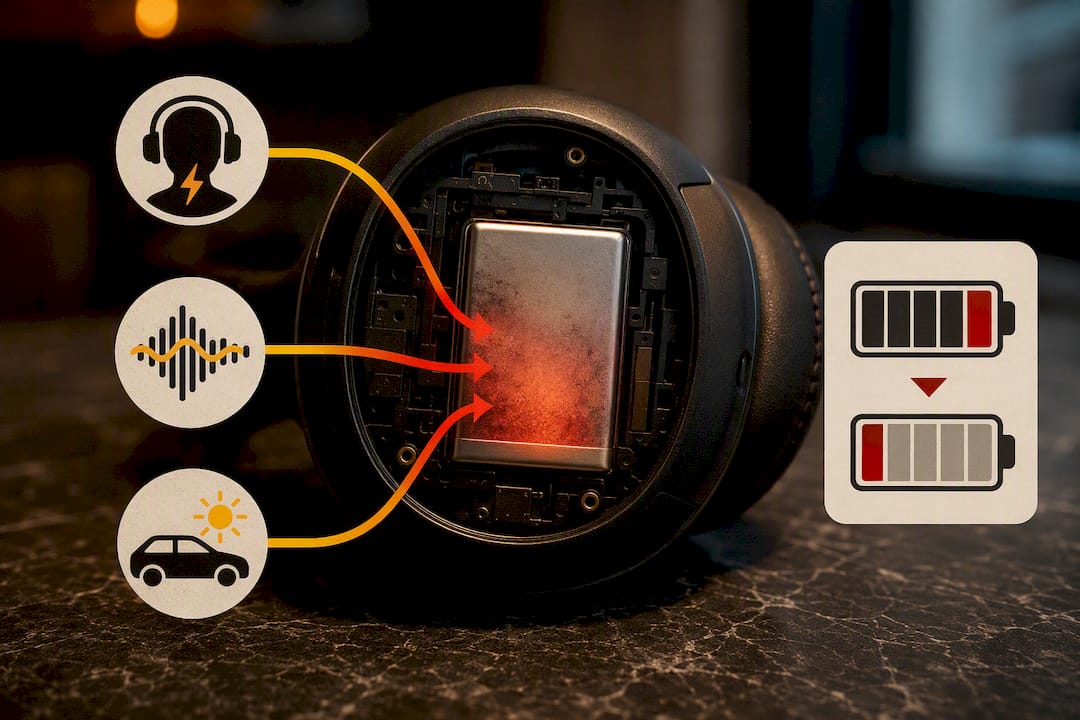
Component placement inside the ear cup matters more than most people realize. Research from UT Austin's Cockrell School of Engineering found that uneven heat distribution around nearby electronics creates temperature gradients that wear one cell faster than the other, which is often exactly why one earbud or one side of a headset dies noticeably sooner. A separate imaging study using x-ray and infrared scans traced this same uneven wear pattern to internal micro-environment heat sources.
Habits that actually help:
- Avoid repeated fast charging when a slower charge is available.
- Keep the headset out of direct sun, hot cars, and near heaters.
- Top up the charge in smaller increments rather than always running it to empty.
Pro Tip: If one ear or one side of a headset drains noticeably faster than the other, that's usually a heat or component-placement issue, not a defective battery. Rotating how you store the headset when charging can sometimes even out the wear.
How Akkuplus Supports Your Repair or Replacement Project
Replacement cells with full spec sheets, including voltage, capacity, and connector details, help customers match numbers instead of guessing. Pricing may reflect availability based on the customer's country.
Beyond parts, Akkuplus offers cell-replacement and refurbishment services for readers who'd rather hand off a sealed or multi-cell job. Battery testers are available to help confirm a new cell is performing correctly before sealing the case back up.
A Practical Checklist Before You Pick Up a Tool
The decision flow really is that simple: inspect the housing first, attempt the DIY swap if you find screws or a panel, and call in a professional the moment you find adhesive, multiple cells, or a swollen battery. Most people overestimate the risk of the easy jobs and underestimate the risk of the hard ones.
Print this before you start:
- Inspect for a panel, screws, or adhesive seam.
- Confirm voltage, connector, and dimensions match before buying a replacement.
- Discharge below 25% and use only non-conductive tools.
- Stop and call a professional if the cell is swollen or the pack has multiple cells.
— Waldemar
Where to Find Replacement Batteries and Testers
Parts for replacement and testing are carried, with detailed specifications to avoid guesswork about connector shape or voltage. Whether you need a small lithium cell for a sealed headset or a way to confirm a new battery is actually holding a charge, the product pages spell out the specs before you buy.
Browse lithium coin and stack cell options if your headset takes a small replaceable cell, or check a button-cell and standard-cell battery tester to verify a new battery before you seal the housing back up. Double check voltage, connector type, and physical dimensions against your old battery before you order. If your headset turns out to need a soldered repair rather than a simple swap, Akkuplus's repair and cell-replacement service is worth a look before you attempt it solo. Head to Akkuplus to check current stock and pricing for your model.
Guides and Research Behind This Article
- iFixit's Bose QuietComfort 35 battery replacement guide, for step-by-step disassembly and desoldering technique
- EPOS's insights on extending equipment life, for manufacturer replaceability trends
- UT Austin Cockrell School research on headphone battery wear, for the science behind uneven battery drain
- Germany's Federal Environment Agency guidance on battery disposal, for safe handling and recycling of damaged cells
Sources
- Why your headphone battery doesn't last — UT Austin Cockrell School
- How we’re making it easier to extend the life of your equipment — EPOS
- Bose QuietComfort 35 battery replacement — iFixit