
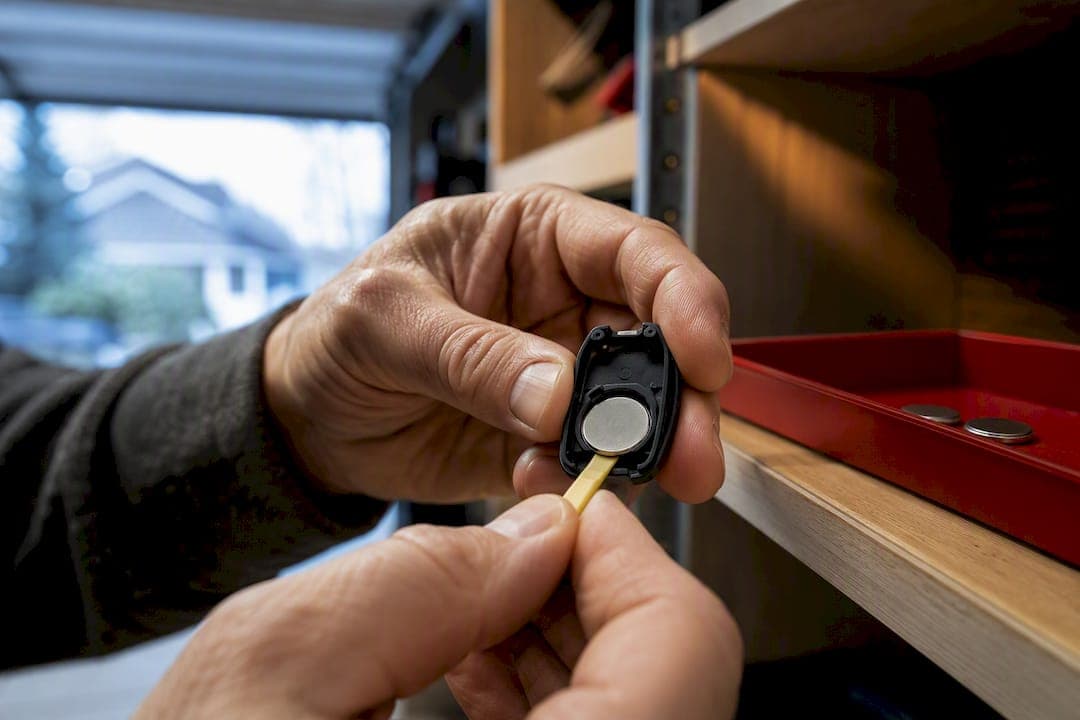
Most handheld garage remotes run on a 3V lithium coin cell such as a CR2032, CR2025, or CR2016, though some keychain transmitters and older openers use an A23 (12V), an AAA/AA, or a 9V block. The fastest way to know for sure is to pop the compartment open and read the code stamped on the old cell or molded into the plastic housing. Match that exact code and orientation, and you're done.
TL;DR:
- Most garage remotes use 3V coin cells such as CR2032, CR2025, or CR2016, which differ slightly in thickness and must be matched precisely.
- Replacing a battery correctly involves checking the code on the old cell or compartment, and avoiding mismatched voltage or size that can damage the remote.
- Proper removal, cleaning contacts, and inserting the new battery with correct polarity are quick steps, but never force incompatible sizes into the slot.
- If the remote still doesn’t work after replacing the battery, issues like contact corrosion, need for resynchronization, or receiver problems should be checked.
- Battery life typically ranges from one to three years, so proactive replacement every 18 to 24 months prevents inconvenient failures, especially in hot or cold conditions.
Table of Contents
- What Garage Remote Battery Type Does Your Opener Use?
- How Do You Replace a Garage Remote Battery Safely?
- Why Won't the Remote Work After a New Battery?
- How Long Does a Garage Remote Battery Actually Last?
- How Should You Dispose of an Old Garage Remote Battery?
- Why Trust This Garage Remote Battery Guide?
- Your Quick Garage Remote Battery Checklist
- Where to Buy the Right Garage Remote Battery
- Sources
What Garage Remote Battery Type Does Your Opener Use?
Before you buy anything, figure out exactly what's inside your remote. Guessing wastes a trip to the store, and buying the wrong garage door opener battery based on size alone is a common mistake that leads people back to the shelf twice.
Coin cells (CR2032, CR2025, CR2016) power the vast majority of modern remotes, according to a detailed breakdown of garage remote battery types. All three share the same 20mm diameter and 3-volt output, but the last two digits of each code tell you the thickness in tenths of a millimeter: a CR2032 is thicker than a CR2025, which is in turn thicker than a CR2016. That difference sounds trivial until you try to force a thicker cell into a slot built for a thinner one. A CR2032 and CR2025 share the same diameter but differ slightly in thickness, which affects fit, and that small gap is often the actual cause of a remote that works one day and skips the next, since a cell sitting slightly loose in its slot loses contact under vibration.
A23 batteries are the tall, narrow 12-volt cells found in a lot of keychain-style gate and garage transmitters, especially older ones. They look nothing like a coin cell, so mixing them up isn't usually the problem. Confusing an A23 with a similarly sized 12V lithium coin cell, however, does happen.
AAA, AA, and 9V batteries show up in wall-mounted keypads, larger remote units, and some backup systems inside the opener motor itself. If you're replacing a battery in a wired keypad rather than a handheld clicker, a 9V block is the usual suspect.
To find the code that matters:
- Check the surface of the old battery itself. It's almost always printed there.
- Look inside the compartment. Manufacturers frequently emboss the required code right into the plastic tray.
- Check the remote's manual or the label on the back of the unit, which often lists the exact part number.
Never assume a replacement is correct just because it fits physically. A wrong-voltage cell can undercharge the circuit and cause the exact intermittent behavior you're trying to fix, or in rare cases damage the receiver board. If the markings are worn away entirely, a replacement coin cell product page with listed dimensions can help you cross-check against the physical dimensions of the old cell.
How Do You Replace a Garage Remote Battery Safely?
Replacing a garage remote battery takes less than five minutes once you know which type you're dealing with, but the process differs depending on whether you're working with a coin cell or a standard cylindrical battery.
Before you start, gather a small flathead screwdriver or a coin, a clean cloth, the correct replacement cell, and enough open space to stand about 20 to 30 feet from the garage door for a range test afterward.
For coin-cell remotes:
- Find the seam on the back or side of the remote. Most pop open with a coin twist or a small flathead pried gently into a marked notch.
- Slide the old cell out, noting which side faces up. Coin cells are almost always installed positive side up, but check the tray marking to confirm.
- Wipe the contacts with a dry cloth if you see any dust, residue, or light corrosion.
- Insert the new cell in the same orientation as the old one.
- Snap the case shut and test the remote from your usual parking distance.
For AA, AAA, A23, or 9V remotes:
- Remove the back cover, usually held by a small screw or a sliding latch.
- Take out the old cells, paying attention to the spring and flat-contact orientation.
- Insert the new batteries so the positive and negative ends match the markings inside the tray.
- Replace the cover and test the remote.
Pro Tip: Keep a battery tester in a kitchen drawer. If a remote acts dead but you're not sure whether it's the battery or the unit itself, testing the old cell first saves you from buying a replacement you didn't need.
A few safety notes matter here. Never let a metal tool bridge both battery terminals at once, since even a small coin cell can spark or heat up if shorted. Don't force a CR2032 into a slot sized for a CR2016, and don't substitute a lower-capacity cell just because it happens to fit. If you're at all unsure whether the old battery was actually the problem, a simple tester confirms voltage before you commit to a purchase.
Why Won't the Remote Work After a New Battery?
A fresh cell fixes most dead remotes, but not all of them. When the clicker still won't open the door, work through these checks before assuming the remote itself is broken.
- Check the LED. A dim, flickering, or unlit indicator when you press the button, even with a new battery installed, often points to bad contacts rather than a bad cell, based on common signs of low garage remote battery function.
- Clean the contacts. A cotton swab dipped in isopropyl alcohol removes the thin layer of oxidation that builds up on battery terminals over time and can block current even with a good cell installed.
- Resync the remote. Most openers have a "Learn" button on the motor unit, usually near the antenna wire. Pressing it, then pressing the remote button within the window your manual specifies, re-pairs the two. Steps vary by manufacturer, so check the manual for your specific resync sequence before assuming the remote is faulty.
- Rule out lockouts and interference. Wall consoles often have a vacation or lock mode that disables all remotes, and newer LED bulbs near the opener sometimes emit radio noise that interferes with the signal.
If you've swapped the battery, cleaned the contacts, and resynced the remote and it still won't respond, the problem is likely in the receiver or the opener's internal logic board rather than anything you can fix by hand. That's the point where calling a garage door technician makes more sense than continuing to troubleshoot.
How Long Does a Garage Remote Battery Actually Last?
A typical coin cell or small alkaline battery lasts somewhere between one and three years in normal residential use, with about two years being the realistic average for most households. That range depends heavily on how the remote is used and stored.
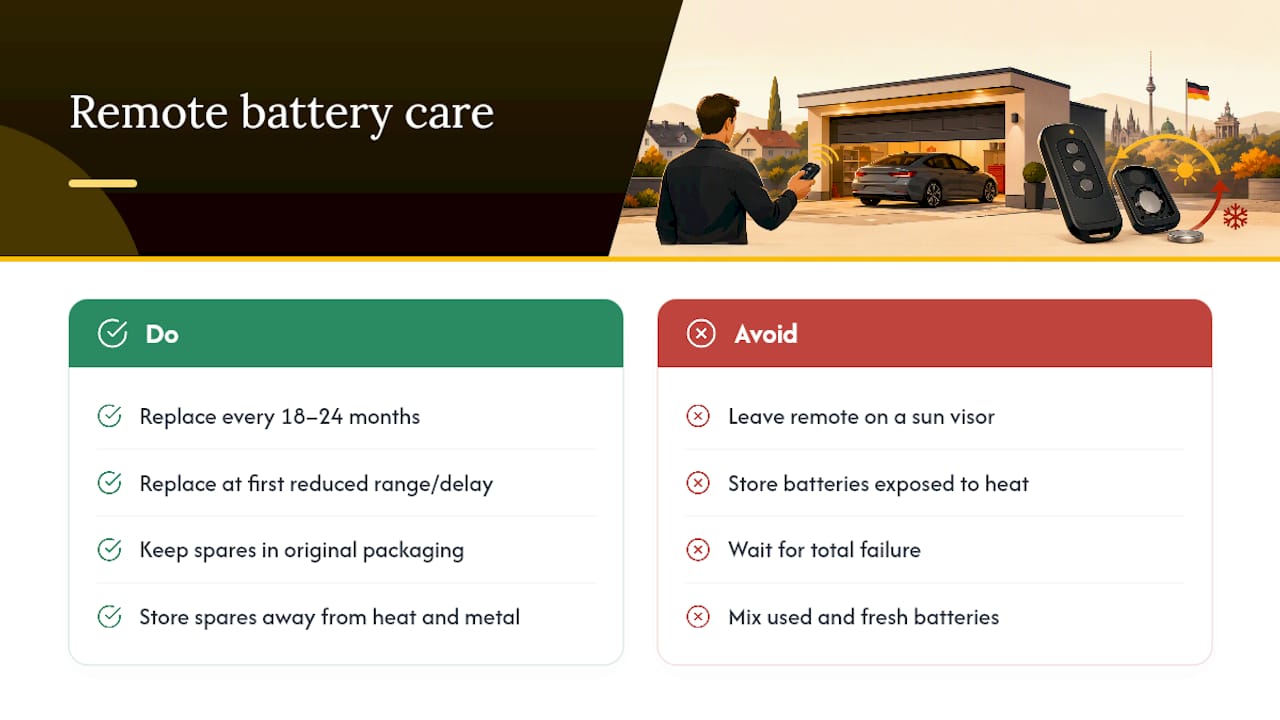
Frequent button presses drain the cell faster, obviously, but so does leaving the remote clipped to a sun visor in a hot car all summer. Heat accelerates the internal chemical reaction inside lithium coin cells, which shortens their working life even if you barely touch the button. Cold garages during winter can also cause temporary voltage drops that mimic a dying battery.
Rather than waiting for the remote to fail entirely, replace the battery proactively every 18 to 24 months, or sooner the moment you notice reduced range or a delay before the door responds. Waiting for total failure usually means getting locked out at an inconvenient moment, like a rainy morning with your hands full.
If you keep spare batteries on hand, store them in their original packaging away from heat and metal objects, and keep any partially discharged remote batteries separate from fresh spares so you don't grab the wrong one by mistake.
How Should You Dispose of an Old Garage Remote Battery?
Never throw a used garage remote battery in the household trash. In Germany, battery disposal is regulated under BattG (the Battery Act, part of the broader ElektroG framework), which requires that batteries be collected separately from general waste and returned through designated channels rather than a curbside bin.
Retailers that sell batteries are legally obligated to accept small quantities of used batteries back free of charge, and municipal collection points are widely available for residents who prefer to drop batteries off separately from a store visit.
Before you transport or drop off any used lithium coin cell, tape both terminals before disposal. This isn't just bureaucratic caution. Safety researchers note that even a small, seemingly "dead" lithium cell retains enough residual energy to cause a short circuit and start a fire if the terminals touch metal or each other, particularly when several used batteries are tossed loose into the same drawer or bag.
A few practical rules to follow:
- Tape the positive and negative terminals of any coin cell before storing or transporting it.
- Drop batteries at a retailer take-back bin or a local Wertstoffhof rather than the trash.
- Never pile multiple used lithium cells together loose in a container.
- If a battery is swollen, leaking, or visibly damaged, isolate it immediately and contact your local waste authority instead of handling it further yourself.
Why Trust This Garage Remote Battery Guide?
This guide comes from a retailer that specializes in batteries and lists exact specifications, including diameter, thickness, and voltage, for the coin cells, cylindrical batteries, and specialty packs covered here. When compartment markings wear off, cross-referencing a product page with listed dimensions, like a Varta cylindrical cell spec sheet, gives you a concrete way to confirm fit before you buy. If you're still unsure which code your remote needs, a simple battery tester or a quick message to a knowledgeable retailer's support team beats guessing twice at the hardware store.
Your Quick Garage Remote Battery Checklist
Print this or save it to your phone, because the next time a remote dies, you'll want the shortcut instead of re-reading a full guide.
Read the code stamped on the old battery or embossed in the compartment. Buy that exact code, nothing close, nothing "similar enough." Install it with correct polarity, snap the case shut, and test from your normal parking distance before you call it done. Tape the old battery's terminals and drop it at a retailer bin or collection point rather than the trash.
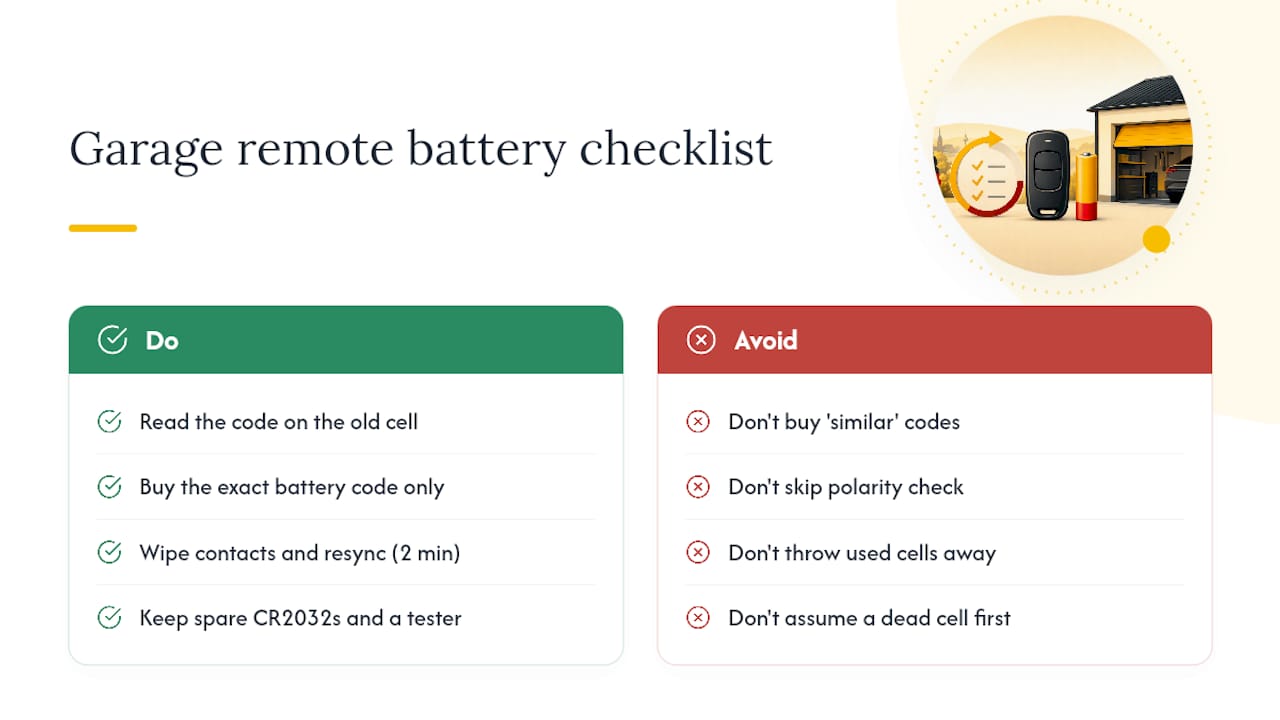
Before you spend money on a new battery at all, try the two-minute check: wipe the contacts clean and resync the remote with the opener's Learn button. Half the "dead remote" calls I've seen traced back to grime on a contact plate, not an actually depleted cell.
Keep a couple of spare CR2032 cells and a cheap battery tester in a kitchen drawer. It's the difference between fixing this in five minutes and losing an evening to a hardware store run.
— Waldemar
Where to Buy the Right Garage Remote Battery
Getting the exact code right is the whole game here, and Akkuplus exists precisely for that moment when you're standing over an open remote trying to match a worn-off stamp to the correct cell. Rather than guessing at a hardware store rack with three similar-looking coin cells, you can search by the exact code, voltage, and dimensions and know you're getting a match.
If the markings on your old battery are too faded to read confidently, a battery tester built for both standard cells and coin cells confirms voltage in seconds and saves you from buying the wrong replacement twice. For wall-mounted keypads or backup circuits that take a 9V block, browse the 9V alkaline battery listing for exact specs before you order. Check the code on your remote, search that code on Akkuplus, and get the right cell shipped instead of hoping the one on the shelf happens to match.
Sources
For deeper detail beyond this guide, the Bavarian state battery disposal guidance covers German take-back rules in full. DEKRA's overview of battery safety explains the fire risks behind terminal taping in more technical depth, and the garage remote battery guide from DoorServPro breaks down coin-cell sizing conventions used across most manufacturers.
- The Definitive Guide to Garage Door Remote Batteries
- DEKRA — Batteries, a valuable raw material source
- Entsorgung von Batterien (Bayern waste guide)
- The Ultimate Guide to Garage Door Remote Battery Sizes