

The fastest practical rate for most AA NiMH cells is 0.5C, which fully charges a typical 2,000 mAh battery in a couple of hours on a smart charger with proper termination. Cells rated for it can handle 1C with the right charger and temperature monitoring, but that speed demands special hardware most people don't own. For everyday use, stick to 0.2C to 0.5C, skip anything with a bare countdown timer, and never mix old and new cells in the same paired slot.
TL;DR:
- A 2,000 mAh NiMH AA cell can safely be fast-charged at 0.5C in about 2 to 2.5 hours with a proper smart charger, but exceeding this rate is only suitable for specialized hardware.
- Reliable fast chargers must detect the voltage dip of −ΔV, monitor temperature changes, and control each slot independently to prevent overcharging, heat damage, or false triggers.
- Charging at 1C is generally only safe if the cell, charger, and monitoring systems are explicitly rated for that current; otherwise, sticking to 0.2C to 0.5C is recommended for regular use.
- Older or heavily cycled cells often require reduced charging rates, such as 0.2C to 0.3C, to account for increased internal resistance and heat generation, which could shorten their lifespan.
- After fast charging, resting cells for at least 15 to 30 minutes ensures internal reactions stabilize, leading to more accurate performance and capacity readings.
Table of Contents
- What "Fast Charging AA Batteries" Actually Means in C-Rates
- How Does a Charger Know When to Stop Charging Fast?
- Why Fast Charging Goes Wrong: Heat, False Peaks, and Bad Chargers
- What to Look for When Buying a Fast Charger
- Fast-Charge Workflows for Every Situation
- Publisher Notes: Why This Guidance Comes From Akkuplus
- Does Battery Age Change How Fast You Can Safely Charge It?
- How Long Should Batteries Rest After a Fast Charge?
- NiMH vs. NiCd: How Chemistry Changes What "Fast" Means
- Does Fast Charging Actually Shorten Battery Life?
- An Editorial Take on Speed Versus Certainty
- Ready to Charge Faster Without Guessing?
- Sources
What "Fast Charging AA Batteries" Actually Means in C-Rates
Every fast charging claim you see on a battery or charger boils down to one number: the C-rate. It's the charge current expressed as a multiple of the battery's rated capacity. A 2,000 mAh AA cell charged at 1C means feeding it 2,000 mA (2 amps). Charge the same cell at 0.5C and you're pushing 1,000 mA. Drop to 0.1C and you're at a gentle 200 mA, the kind of trickle rate that barely warms the cell.
This single number changes everything about how long a charge takes and how much stress the battery absorbs. Once you know a cell's capacity, you can do this math for any charger you're considering.
Here's how the math works out for common AA cell sizes, assuming a smart charger with proper cutoff:
- 1,500 mAh cell: 0.1C = 150 mA (roughly 10 to 12 hours), 0.2C = 300 mA (about 5 to 6 hours), 0.5C = 750 mA (about 2 to 2.5 hours)
- 2,000 mAh cell: 0.1C = 200 mA (10 to 12 hours), 0.2C = 400 mA (5 to 6 hours), 0.5C = 1,000 mA (roughly 2 to 2.5 hours), 1C = 2,000 mA (around 1 to 1.5 hours on cells and chargers built for it)
- 2,500 mAh cell: 0.5C = 1,250 mA (roughly 2.5 hours), 1C = 2,500 mA (about 1.5 hours with active cooling)
- 2,700 mAh cell: 0.5C = 1,350 mA (about 2.5 to 3 hours), 1C = 2,700 mA (near 1.5 hours, only on chargers designed for that current)
Notice those time estimates don't line up with simple division. That's because NiMH charging isn't 100% efficient. Coulometric efficiency for NiMH sits around 66%, meaning you have to push in roughly 1.5 times the rated capacity to actually fill the cell. A 2,000 mAh battery charged at a theoretical "2-hour rate" (1C) actually needs closer to 70 to 90 minutes of real input once you account for the energy lost as heat, and that inefficiency climbs as current increases.
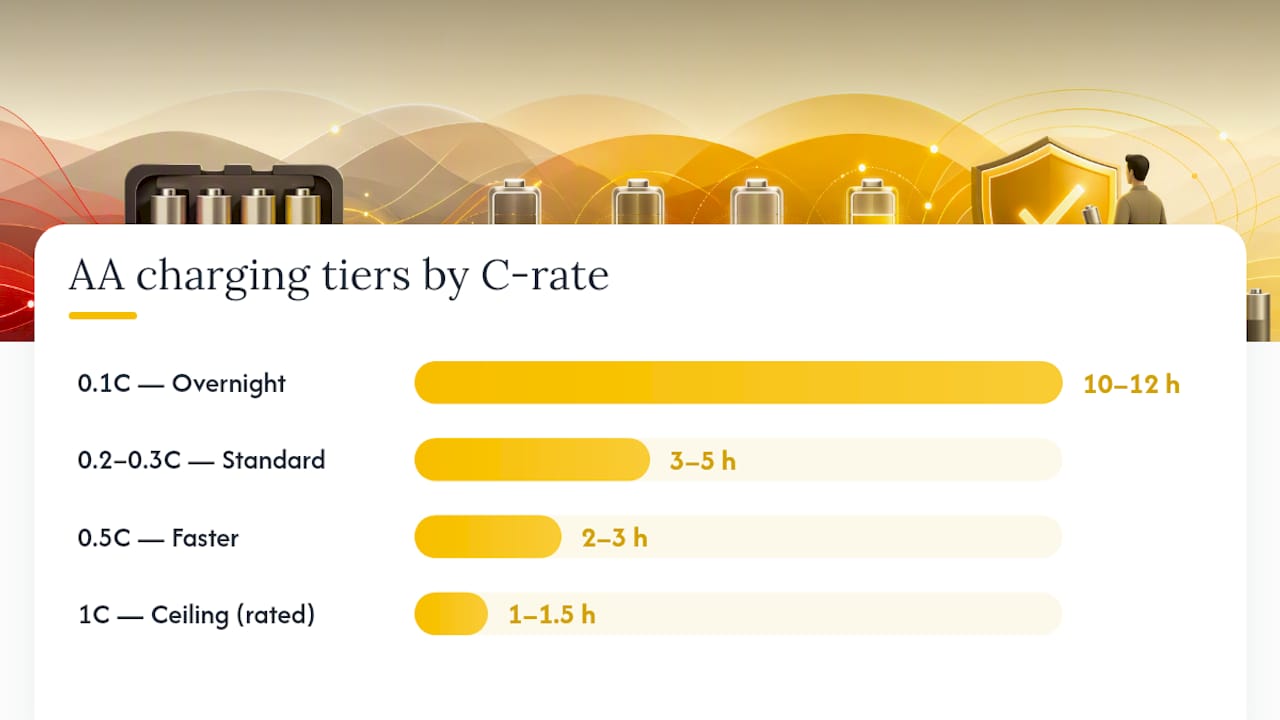
Manufacturers who publish practical charging tables tend to land on similar tiers: gentle overnight charging at 0.1C runs 10 to 12 hours, standard charging at 0.2C to 0.3C takes 3 to 5 hours, and faster charging at 0.5C completes in roughly 2 to 3 hours, with 1C reserved for cells and chargers explicitly rated for it. That last tier isn't a suggestion to push every battery to its limit. It's a ceiling that only applies when the cell, the charger, and the monitoring all agree to work together.
Pro Tip: If you're not sure of a cell's exact capacity, check the print on the battery itself. Most NiMH AAs list mAh right on the label, and that number is the only one you need to calculate a safe current for any C-rate.
How Does a Charger Know When to Stop Charging Fast?
A fast charger stays safe not because of the current it delivers, but because of how precisely it recognizes "full" and cuts power the instant it gets there. Three signals do that job, and a charger without at least one of them has no business running high current into your batteries.
The gold standard is negative delta-V, or −ΔV. As a NiMH cell approaches full charge, its voltage rises, peaks, then actually dips slightly as internal resistance increases and excess energy converts to heat instead of chemical storage. Quality smart chargers detect that dip, typically a drop of −5 to −10 mV per cell, and cut the charge current the moment they see it. That small voltage dip is the clearest signal a NiMH cell will ever give you that it's done.
Temperature sensing backs that up. Rather than watching for an absolute temperature ceiling alone, better chargers track the rate of temperature change, known as dT/dt. A cell that's heating up quickly is telling the charger the same thing the voltage dip is: charging is finished and any more current just becomes waste heat. At higher currents, chargers also apply a hard absolute cutoff, often somewhere in the 45 to 50 degree Celsius range, as a backstop in case the rate-of-change detection misses the moment.
The termination math that matters: A −5 to −10 mV per cell voltage dip is the signal quality chargers watch for to end a fast charge safely. Miss that window and you're overcharging into pure heat.
The third requirement is independent channel sensing. Cheap chargers wire two AA slots together in a pair, meaning both cells receive identical current regardless of their actual state of charge. Charge a fresh cell alongside a half-depleted one in a paired charger and one of them gets overcharged while the other undercharges, because the charger has no way to see them separately. Independent per-slot monitoring of voltage, current, and internal resistance is what separates a charger you can trust at 0.5C or higher from one you should only ever run at a trickle.
One more distinction worth knowing before you shop: constant-current/constant-voltage, or CC/CV, is the charging profile lithium-ion and lithium-polymer cells use, not NiMH. If you see a charger advertising CC/CV as its termination method, it's built for lithium chemistries and has no business charging your AA NiMH cells, and vice versa; a NiMH-only charger should never be used on lithium AAs like the Energizer Ultimate Lithium. Mixing chemistries and charging methods is one of the fastest ways to damage a battery or a charger.
A few features consistently separate a charger you can trust with fast rates from one you can't:
- Independent per-slot voltage and current monitoring, not paired slots
- −ΔV detection as the primary "done" signal for NiMH
- Temperature sensing with both dT/dt tracking and an absolute cutoff
- A safety timer as backup only, never as the sole termination method
Why Fast Charging Goes Wrong: Heat, False Peaks, and Bad Chargers
Every failure mode in fast charging traces back to one root cause: the charger can't tell when to stop. Heat is the consequence, not the cause, and it's consistently the number-one threat to a NiMH cell's usable life. Even a charger that eventually terminates correctly does some damage if it lets the cell run hot for the final stretch of the charge. Chronic overcharging compounds that damage, drying out the internal electrolyte, degrading capacity cycle over cycle, and in worst cases causing a cell to vent or leak.
False peaks are the sneakier problem. A loose battery contact, a charger sitting in a cold garage, or a cell charged right after being pulled from a freezing car can all produce a voltage curve that looks like the −ΔV dip when it isn't one. Unstable ambient temperatures and poor contacts can mislead detection algorithms, triggering an early cutoff that leaves the battery only partially charged, or worse, missing the real dip entirely and continuing to push current into an already-full cell.
Paired-slot chargers and timer-only chargers fail in more predictable but equally damaging ways:
- Paired slots force two batteries to share identical current no matter their individual state, guaranteeing one is overcharged whenever they don't start at matching charge levels.
- Timer-only termination assumes every battery reaches full charge in the same fixed window, which ignores capacity differences, age, and ambient temperature entirely.
- No temperature sensing means the charger has no way to know it's cooking a cell until the housing is already too hot to touch.
This is how what's sometimes called the "charger graveyard" forms: a drawer of dead $8 chargers that killed a battery, then got replaced by another cheap unit that killed the next one. Cheap, unbranded chargers frequently lack proper termination circuitry, and the batteries pay the price first. Spending $25 to $40 on a charger with real per-slot sensing costs less over three years than replacing batteries every few months.
Pro Tip: If a charger's spec sheet doesn't mention −ΔV, dT/dt, or independent channels by name, assume it's timer-based even if the box says "fast charge." Manufacturers who've built real termination logic almost always advertise it.
What to Look for When Buying a Fast Charger
Buying the right charger comes down to reading past the marketing language on the box and checking for specific, named features. Here's the order to check them in:
- Confirm independent channel monitoring. The spec sheet or manual should explicitly state each slot is monitored and controlled separately, not just that the charger "has multiple slots."
- Look for named termination methods. You want to see −ΔV detection and temperature-based cutoff (dT/dt plus an absolute limit) listed by name, not a vague "smart charging" claim.
- Check the supported C-rate range. A trustworthy charger states the current it delivers per slot and which cell capacities that current is appropriate for, not just a generic "fast charge" badge.
- Verify cooling provisions at higher currents. Any charger delivering more than roughly 1 amp per slot should have a fan or clear ventilation, since charging at very high currents like 3 amps per cell generates real heat that needs active management.
- Confirm safety certification. Look for compliance with EN 60335-2-29, the European standard covering household battery charger safety, or your region's equivalent.
A charger like the Ansmann ACS 110 illustrates what this looks like in practice: microcontroller-driven charging logic built specifically around NiMH and NiCd chemistry, rather than a generic timer bolted onto a power brick.
Beyond the checklist, a few red flags should end the conversation immediately:
- Slots described as "paired" or "dual-slot" charging without independent per-cell control
- Any charger whose only termination method is a fixed timer
- Missing or vague specs, especially no stated current per slot or supported cell chemistries
- No visible safety certification marks and no mention of applicable standards
- Marketing copy that promises "1 hour full charge" without naming the current, the cell capacity assumed, or the termination method used
One more thing worth knowing before you shop by capacity: a higher-capacity cell isn't automatically better for fast charging. A 2,700 mAh Panasonic AA cell charged at 0.5C draws more current in absolute terms than a 1,500 mAh cell at the same C-rate, which means it generates more heat for the same relative charge speed. If you're buying cells specifically to fast-charge them often, match the charger's maximum per-slot current to the capacity range you're actually using, rather than assuming any charger handles any cell.
Fast-Charge Workflows for Every Situation
Not every charge is an emergency, and treating a routine overnight top-up like a race is exactly how batteries get damaged for no good reason. Match the workflow to the actual urgency.
Emergency top-up (you need power in under two hours):
- Inspect the cells for swelling, leakage, or corrosion before inserting them. Damaged cells have no business on a fast charger.
- Match cells by approximate capacity and age if charging more than one at a time; don't pair a two-year-old cell with a brand-new one.
- Select 0.5C to 1C only if your charger explicitly supports that rate with per-slot −ΔV and temperature sensing.
- Check cell temperature by hand every 20 to 30 minutes. Warm is normal; hot enough that you want to pull your hand away is not.
- Never leave a high-current charge unattended in a closed drawer or box without ventilation.
Regular fast charge (a few hours to spare):
- Do the same visual inspection for damage or leakage.
- Set the charger to 0.3C to 0.5C, which balances speed against heat far better than pushing 1C every time.
- Let the charger's automatic termination do its job. Check in once near the expected finish time rather than hovering the whole session.
Overnight or no time pressure:
- Use 0.1C. This is the gentlest rate and the one that does the least cumulative damage over hundreds of cycles.
- Charge in a well-ventilated spot away from anything flammable, as a matter of habit rather than because the risk is high at this rate.
After any fast charge, let the cells rest for at least 15 to 30 minutes before using them or putting them back in storage. NiMH chemistry needs a short window for internal chemical reactions to stabilize after the electrical input stops, and using a cell immediately off a hot charge can give you a misleadingly short runtime reading. If you fast-charge the same set of cells regularly, running an occasional capacity test with a dedicated tester tells you whether they're still holding their rated mAh or quietly losing capacity cycle by cycle.
Pro Tip: Keep a simple log, even a sticky note in the battery drawer, noting which cells get fast-charged regularly. Cells that see 0.5C or higher weekly will show wear years before ones you only trickle-charge, and knowing which is which saves you from guessing why a device suddenly runs half as long.
Publisher Notes: Why This Guidance Comes From Akkuplus
Akkuplus built its catalog around the reality that most battery problems trace back to charger mismatches, not bad luck. The site's product range spans NiMH and NiCd AA cells, microcontroller-based chargers, and diagnostic testers, organized for shoppers across multiple European markets rather than a single storefront with one generic "charger" category.
This guide was written by Waldemar, drawing on the technical standards and manufacturer documentation cited throughout, rather than a generic rewrite of marketing copy.
A few resources worth bookmarking if you're building out a fast-charging setup:
- Microcontroller chargers like the Ansmann ACS 110, built around real termination logic rather than a timer
- High-capacity NiMH cells such as the 2,700 mAh Panasonic AA, a common baseline for readers comparing fast-charge current against capacity
If you're weighing a specific charger or cell against your own device's needs, Akkuplus's product pages list the specs this guide recommends checking, including supported chemistries and current ranges, so you can compare before buying rather than after.
Does Battery Age Change How Fast You Can Safely Charge It?
Yes, and the difference is bigger than most people expect. A brand-new NiMH cell has low internal resistance, which means it converts charge current into stored energy efficiently and stays relatively cool even at 0.5C. As a cell ages through hundreds of charge cycles, internal resistance climbs, and that same current increasingly turns into heat instead of stored charge.
This is why a two-year-old AA that used to handle 0.5C without complaint might now run noticeably warmer at the same rate. The −ΔV signal itself can also become less pronounced in aging cells, sometimes making termination detection less crisp and increasing the odds of a slightly delayed cutoff.
The practical fix is simple: drop older or heavily cycled cells down a tier. If a cell is more than a year or two into regular use, or you've noticed it running noticeably warmer than newer cells in the same charger, charge it at 0.2C to 0.3C instead of 0.5C. Running a capacity test periodically and comparing delivered mAh against the rated capacity tells you objectively whether a cell has aged past the point where fast charging still makes sense. A cell that's lost more than 20% of its rated capacity or shows a rising internal resistance reading is a candidate for retirement, not another round at 1C.
How Long Should Batteries Rest After a Fast Charge?
Fifteen to thirty minutes is the practical minimum, and it matters more than most fast-charging guides let on. When a NiMH cell finishes charging, especially at 0.5C or higher, the chemical reactions inside haven't fully settled the instant the charger cuts power. Voltage and internal temperature are still normalizing.
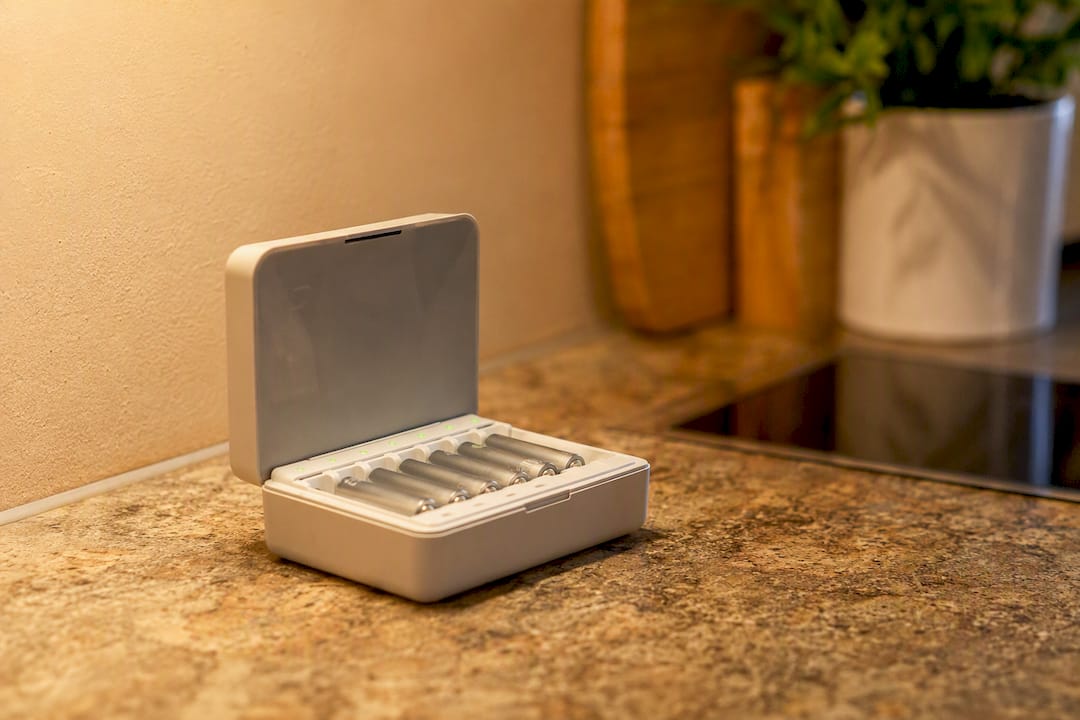
Using a cell immediately, or worse, dropping it straight into a device and then judging its performance, can give you a false read on how well it actually charged. A cell that seems to underperform right off a fast charge often tests completely normal 30 minutes later once it's cooled and stabilized.
The rest period matters even more before storage. Putting a warm cell straight into a sealed battery case or a drawer with other batteries traps residual heat against neighboring cells, doing them no favors either. Let cells return to room temperature before storing them, and if you're testing capacity to check for degradation, always test after the rest window, never immediately off the charger. This single habit prevents a lot of unnecessary battery replacements bought on the strength of a bad reading.
NiMH vs. NiCd: How Chemistry Changes What "Fast" Means
NiMH and NiCd both accept fast charging, but they don't behave identically once you push the current up, and treating them as interchangeable is a common mistake. NiCd cells tolerate higher charge rates with less internal heat buildup than NiMH, largely because their internal chemistry generates less resistance-driven heat at a given current. That's part of why older fast chargers, many designed in the NiCd era, sometimes run currents that are genuinely too aggressive for a NiMH cell of the same physical size.
NiMH cells, in exchange for that lower heat tolerance at high current, deliver meaningfully more capacity in the same AA form factor: modern NiMH AAs commonly reach 2,000 to 2,700 mAh, where NiCd AAs typically top out well below that. NiMH is also far less prone to the "memory effect" that plagued NiCd cells, where partial discharge cycles could temporarily suppress usable capacity.
The takeaway for fast charging specifically: never assume a charger built for one chemistry is calibrated correctly for the other. A charger's manual or spec sheet should state which chemistry its fast-charge presets were tuned for, and if it doesn't distinguish, default to the more conservative 0.2C to 0.3C range regardless of which chemistry you're loading.
Does Fast Charging Actually Shorten Battery Life?
Charged correctly, with real termination and temperature monitoring, fast charging at 0.5C doesn't dramatically shorten a NiMH cell's usable life compared to standard 0.2C charging. The variable that actually determines longevity is heat exposure over the full charge cycle, not the C-rate number by itself.
That said, standard charging at 0.1C to 0.2C carries a wider margin for error. A cheap timer-based charger running a slow rate does far less damage on a bad day than the same cheap charger running 1C, simply because there's less energy and less heat involved if something goes wrong. Fast charging removes that safety margin. It demands a charger that actually does its job correctly, every single time, because the consequences of a missed termination scale up with the current.
In practice, this means the real longevity comparison isn't "fast versus standard" so much as "correctly terminated versus not." A quality charger running 0.5C with proper −ΔV and temperature sensing will treat a cell better over its lifetime than a bargain timer charger running 0.2C, because the bargain charger is guessing at "done" instead of measuring it. Speed isn't the enemy. Guesswork is.
An Editorial Take on Speed Versus Certainty
Most fast-charging advice online treats speed as the whole story: buy the charger with the biggest amp number, and you're set. That's backwards. The actual variable that determines whether fast charging helps or hurts you is termination quality, and every C-rate number in this guide is meaningless without a charger that can accurately detect "done."
What's underrated is how much the boring stuff, independent channel sensing, a stated dT/dt cutoff, matters more than the headline current rating. A charger that fast-charges at 0.5C with real per-slot monitoring will treat your batteries better over three years than one that claims 1C with a timer and a prayer. If you take one thing from this guide, prioritize the termination method over the speed claim on the box. Speed is only as safe as the electronics watching over it.
— Waldemar
Ready to Charge Faster Without Guessing?
Once you know the C-rate math and the termination science, the gap between a safe fast charge and a wrecked battery comes down to one purchase: the charger itself. Akkuplus stocks NiMH and NiCd AA cells alongside microcontroller-based chargers built around real −ΔV and temperature termination, so you're not stuck decoding vague "fast charge" claims on a box.
If you're not sure whether your current cells are still worth fast charging, start with a battery tester built for standard and button cells to check real delivered capacity against the rated number before you invest in a new charger. For high-drain devices where NiMH's charge time isn't worth the wait at all, the Energizer Ultimate Lithium AA skips the charging question entirely with a different chemistry built for single use. Compare specs on either page, and reach out to Akkuplus directly if you want a recommendation matched to your specific devices and charging habits.
Sources
- Lygte-info
- NiMH charging technical guidance (PowerStream)
- Temperature rise when charging AA/AAA NiMH at very high current (SkyRC blog)